
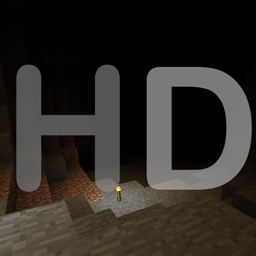
Hardcore Darkness مود لماينكرافت 1.12.2
يزيل هذا المود الحد الأدنى من الإضاءة الموجودة دائمًا في Minecraft
الوصف
لاحظت ذلك بنفسك على الأرجح، لكن الظلام في ماينكرافت لا يكون حالكًا تمامًا أبدًا. حتى لو كنت في كهف بلا مشاعل، ستظل قادرًا على رؤية شيء ما بغض النظر عن إعداد جاما لديك. هذا المود يغيّر ذلك، فهو يزيل الحد الأدنى لضوء الكتل وضوء السماء، لذا إن لم يكن هناك مصدر ضوء فسيكون الجو مظلمًا فعلاً.
الاستخدام
بعد تثبيت هذا المود سيكون في الوضع 0، وهناك 3 أوضاع مختلفة يمكن تغييرها في ملف الإعدادات:
- لا يوجد حد أدنى لضوء الكتل وضوء السماء
- لا يوجد حد أدنى لضوء الكتل
- لا يوجد حد أدنى لضوء الكتل وضوء السماء يعتمد على طور القمر
هناك أيضًا بعض الخيارات الأخرى في ملف الإعدادات:
- "Dark Nether" : "Whether the minimum light of the nether should also be removed"
- "Dark End" : "Whether the minimum light of the end should also be removed"
- "Dark Twilight Forest" [1.7.10] : "Whether the time in the Twilight Forest should be fixed to midnight instead of dusk"
- "AlternativeNightSkylight" : "In Mode 1 & 2 the skylight has a slightly blue tint, this option replaces that with a slightly green/yellow tint"
- "Dimension Blacklist" : "A list of dimension ids separated by "," in which Hardcore Darkness will not take effect"
إذا ثبّتت هذا المود على خادم فسيتعين على جميع العملاء تثبيت Hardcore Darkness. كما سيُجبر العملاء على استخدام ملف الإعدادات الذي تحدده على خادمك.
لا تتردد في استخدام هذا المود في أي حزمة مودات
كيفية تثبيت Hardcore Darkness
With Millida Launcher
Install Millida Launcher
The launcher is free: download it at millida.net/launcher and sign in with any nickname.
Click “Install” on this page
The launcher opens and installs the mod for Minecraft 1.12–1.12.2 automatically.
Launch the game
A profile with it appears in the launcher: click “Play”.
Manually
Download the file for your version
In the version list above, pick the file HardcoreDarkness-MC1.12.2-2.0.jar (32 KB) for your game version.
Put it in the mods folder
The folder is inside .minecraft (Windows: %appdata%\.minecraft\mods). If it does not exist, create it.
Launch the loader profile
Open “Mods” in the main menu: Hardcore Darkness should be in the list.
Minecraft 1.12.2 runs on Java 8: with a different Java version the game may close right after launch.
الإصدارات
مع المتطلبات
| Minecraft | المشغّل | الملف | التاريخ | الإجراءات |
|---|---|---|---|---|
| 1.12.1 | — | HardcoreDarkness-MC1.12.2-2.0.jar31.6 KB 1 |
الأسئلة الشائعة
Which Minecraft versions does Hardcore Darkness work on?
There are files for 1.12.2, 1.12.1, 1.12. The newest is 1.12.2.
Which Java does Hardcore Darkness need?
Minecraft 1.12.2 runs on Java 8. If the game closes right after launch, the usual cause is the wrong Java version in the profile settings.
Where can I download Hardcore Darkness safely?
On this page: the file HardcoreDarkness-MC1.12.2-2.0.jar (32 KB) is stored on Millida’s server, with no link shorteners. SHA-1 checksum: 1bced77c70bbc1442412c397e1ca108627bda282.
التقييمات
كن أول من يقيّم Hardcore Darkness


