
Flower Map مود لماينكرافت 26.3
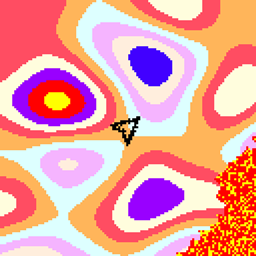
يعرض تدرج الزهور بأسلوب الخريطة المصغرة
 Fabric
 NeoForge
Flower Map
Shows the flower gradient, minimap-style. As the gradient is 3-dimensional since 1.18, this mod has control over the y level for which the map is rendered. By default it uses the players y pos, but it can be switched to manual y mode, which can be controlled via keybinds.
This does work in multiplayer without entering the seed, as long as the biomes haven't been modified via datapack on the server side.
كيفية تثبيت Flower Map
With Millida Launcher
Install Millida Launcher
The launcher is free: download it at millida.net/launcher and sign in with any nickname.
Click “Install” on this page
The launcher opens and installs the mod for Minecraft 26.3 on Fabric or NeoForge automatically.
Launch the game
A profile with it appears in the launcher: click “Play”.
Manually
Install Fabric or NeoForge
The loader must match the game version of the mod file, for example Minecraft 26.3. After installing it, a separate profile appears in your launcher.
Download the file for your version
In the version list above, pick the file flowermap-fabric-26.3-2.0.11.jar (24 KB) for your game version and loader.
Put it in the mods folder
The folder is inside .minecraft (Windows: %appdata%\.minecraft\mods). If it does not exist, create it.
Launch the loader profile
Open “Mods” in the main menu: Flower Map should be in the list.
الإصدارات
مع المتطلبات
| Minecraft | المشغّل | الملف | التاريخ | الإجراءات |
|---|---|---|---|---|
| 26.3 | Fabric | Flower Map 2.0.11 [Fabric]24.5 KB | ||
| 26.3 | NeoForge | Flower Map 2.0.11 [NeoForge]25.1 KB |
التقييمات
كن أول من يقيّم Flower Map


