

Feather remake مود لماينكرافت 26.3
Feather Remake Client مصمم لمحاكاة وظائف العملاء المشهورين مع تجربة واجهة رائعة لأجهزة Linux التي تشغل ماينكرافت مثل Feather client
- تنزيلات
- 21 تنزيلات
- مشاهدة
- 63 مشاهدة
- محدّث
- محدّث 02.10.2026
- 26.1 — 26.3
 Fabric
- العميل
Feather Remake
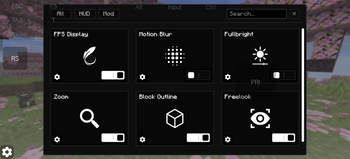
This Client is a utility mod which adds many functions with monochrome UI elements.
this client is generally made for people who use linux devices and want to experience clients eg. feather client

Features
- In game account switcher
- Modrinth downloader Screen (to download content directly from mc)
- Modules eg. Fps hud, Ping hud, Cord hud.
- Mod Menu
- Fog customizer
- Item resizer
- Keybind Scroll
- Titlescreen Switcher (to change titlescreen to vanilla if custom one hurts you)
- Module Resizer and Positioning.
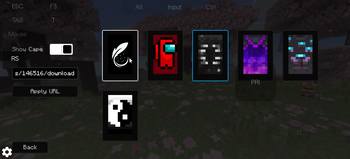
- Skin and Cape options. (only works client-side)
Modules
- Fps
- Ping
- Cordinate
- Speed
- Potion
- Bossbar
- Direction
- Memory
- Cps
- Timer
- Clock
- Playtime
- Many more, idk specifically.
Compatibility
- Fabric loader
- 1.21.1 - 26.2
- Fabric API
- Linux, Windows and even Android
UI
- Monochrome Theme
- Toggle Switches
- Buttons
- Sliders
- Textfields
Optimization this mod is not made to increase fps or performance any kind of
Preview
كيفية تثبيت Feather remake
With Millida Launcher
Install Millida Launcher
The launcher is free: download it at millida.net/launcher and sign in with any nickname.
Click “Install” on this page
The launcher opens and installs the mod for Minecraft 26.1–26.3 on Fabric automatically.
Launch the game
A profile with it appears in the launcher: click “Play”.
Manually
Install Fabric
The loader must match the game version of the mod file, for example Minecraft 26.3. After installing it, a separate profile appears in your launcher.
Download the file for your version
In the version list above, pick the file feather_legacy-1.4.0.jar (16 MB) for your game version.
Put it in the mods folder
The folder is inside .minecraft (Windows: %appdata%\.minecraft\mods). If it does not exist, create it.
Launch the loader profile
Open “Mods” in the main menu: Feather remake should be in the list.
Feather remake works on the player’s side only: there is no need to install it on a server.
الإصدارات
مع المتطلبات
| Minecraft | المشغّل | الملف | التاريخ | الإجراءات |
|---|---|---|---|---|
| 26.3 | Fabric | 26.315.5 ميغابايت 17 | ||
| 26.2 | Fabric | 26.215.5 ميغابايت 4 | ||
| 26.1.2 | Fabric | 26.1.215.5 ميغابايت | ||
| 26.1.2 | Fabric | 26.1.29.8 ميغابايت | ||
| 26.1.2 | Fabric | 26.1.29.8 ميغابايت | ||
| 26.1.2 | Fabric | 26.1.29.5 ميغابايت | ||
| 26.1.2 | Fabric | 26.1.29.3 ميغابايت | ||
| 26.1.2 | Fabric | 26.1.29.3 ميغابايت |
التقييمات
كن أول من يقيّم Feather remake


