
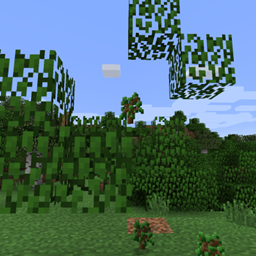
Fast Leaf Decay مود لماينكرافت 1.21.10
يجعل الأوراق تتساقط بشكل أسرع عند قطع الشجرة.
 Fabric
 NeoForge
 Forge
ForgeFastLeafDecay
المود الأصلي الذي يعمل من جهة الخادم فقط والذي يتخلص من تلك الأوراق المزعجة العائمة في الهواء!
مود بسيط لماينكرافت فورج يسرّع تساقط الأوراق بعد قطع خشب الشجرة. افتراضيًا لن يستغرق الأمر سوى حوالي خمس ثوانٍ قبل أن تختفي جميع الأوراق.
لا حاجة لأي إعدادات، ولا حاجة لتثبيته على العميل أيضًا! ما عليك سوى إسقاط ملف jar في مجلد المودات لديك (على الخادم إذا كنت تلعب على خادم) أو التثبيت باستخدام عميل CurseForge وأنت جاهز للانطلاق.
لا يسبب أي تباطؤ ملحوظ لأنه لا يحاول تنفيذ أي حيل مخصصة للتخلص من الأوراق، بل يتبع فقط كود ماينكرافت العادي للتساقط.
لماذا تستخدم هذا المود بدلًا من غيره؟
- لا تباطؤ. بينما تحاول مودات أخرى إزالة كل الأوراق في اللحظة نفسها، هذا المود يوزّعها. لا تعثّر عند إزالة آخر قطعة خشب. كلما كانت أشجارك أكبر، كان ذلك أكثر وضوحًا.
- كود بسيط للغاية. لا أطر عمل، لا حشو. مجرد عدد قليل من معالجات الأحداث.
- الأصلي! كنا الأولين ;-)
مراجعة المود، شكرًا لـ beardedgoof!
المتطلبات
الخوادم فقط هي التي تحتاج إلى هذا المود، لذا إذا كنت تلعب على خادم مثبّت عليه فلن تحتاج إلى تثبيته على العميل. يمكنك تثبيته على العميل، لكن لن يكون له أي تأثير.
التوافق
سيسرّع هذا المود تساقط الأوراق التي تستخدم إما وسم كتلة الأوراق أو ترث من LeavesBlock. وهذا يعني أن معظم الأشجار المضافة من المودات يجب أن تعمل أيضًا. إذا واجهت أي مشاكل، فيرجى إخباري.
الإعدادات
لضبط معدلات التساقط، اطّلع على الإعدادات في مجلد serverconfigs الخاص بعالمك.
المشاكل المعروفة (في التوافق)
لا توجد حاليًا أي مشاكل توافق معروفة مع هذا المود.
حزم المودات
لا تتردد في إضافة هذا المود إلى حزمتك. لا حاجة لأي إذن! لكن سأقدّر سطرًا في التعليقات.
كيفية تثبيت Fast Leaf Decay
With Millida Launcher
Install Millida Launcher
The launcher is free: download it at millida.net/launcher and sign in with any nickname.
Click “Install” on this page
The launcher opens and installs the mod for Minecraft 1.14.4–1.21.10 on Fabric, Forge or NeoForge automatically.
Launch the game
A profile with it appears in the launcher: click “Play”.
Manually
Install Fabric, Forge or NeoForge
The loader must match the game version of the mod file, for example Minecraft 1.21.10. After installing it, a separate profile appears in your launcher.
Download the file for your version
In the version list above, pick the file FastLeafDecay-Fabric-36.jar (18 KB) for your game version and loader.
Put it in the mods folder
The folder is inside .minecraft (Windows: %appdata%\.minecraft\mods). If it does not exist, create it.
Launch the loader profile
Open “Mods” in the main menu: Fast Leaf Decay should be in the list.
Minecraft 1.21.10 runs on Java 21: with a different Java version the game may close right after launch.
الإصدارات
مع المتطلبات
| Minecraft | المشغّل | الملف | التاريخ | الإجراءات |
|---|---|---|---|---|
| 1.21.8 | Fabric | FastLeafDecay-Fabric-36.jar18.5 KB 52 | ||
| 1.21.8 | NeoForge | FastLeafDecay-NeoForge-36.jar28.9 KB 4 | ||
| 1.21.5 | Forge | FastLeafDecay-34.jar9.5 KB 7 | ||
| 1.14.4 | — | FastLeafDecay-v17.jar8 KB |
الأسئلة الشائعة
Which Minecraft versions does Fast Leaf Decay work on?
There are files for 1.14.4–1.21.10, 9 versions in total. The newest is 1.21.10.
Is Fast Leaf Decay for Forge or Fabric?
There are files for Fabric: 1.21.6–1.21.10, for Forge: 1.21.3–1.21.5 and for NeoForge: 1.21.6–1.21.10.
Does Fast Leaf Decay need other mods?
The author lists no required dependencies: the Fabric, Forge or NeoForge loader is enough.
Which Java does Fast Leaf Decay need?
Minecraft 1.21.10 runs on Java 21. If the game closes right after launch, the usual cause is the wrong Java version in the profile settings.
Where can I download Fast Leaf Decay safely?
On this page: the file FastLeafDecay-Fabric-36.jar (18 KB) is stored on Millida’s server, with no link shorteners. SHA-1 checksum: 4bbd3a8fa946118f1f945ae1e3fa0d1c325a8f85.
التقييمات
كن أول من يقيّم Fast Leaf Decay


