

Expanded Equivalence مود لماينكرافت 1.12.2, 1.19.2
إضافة EMC لعناصر مودات مختلفة وآليات صناعة لـ ProjectE.
- تنزيلات
- 1 تنزيلات
- مشاهدة
- 16 مشاهدة
- محدّث
- محدّث 24.10.2026
- 1.12.2 — 1.19.2
 Forge
Forge
حول مود Expanded Equivalence
هذه إضافة إلى ProjectE.
تتطلب هذه الإضافة HammerLib.
تضيف هذه الإضافة تكاملاً مع ProjectE والكثير من المودات الأخرى. وتهدف إلى تسجيل قيم EMC لأنظمة الصناعة المختلفة مثل Fusion Crafting من Draconic Evolution، والصناعة المتطرفة من Avaritia، وغيرها.
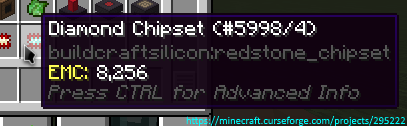
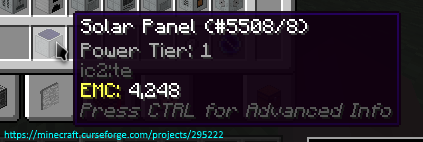
هنا يمكنك رؤية جميع المودات/الخطط المدعومة حالياً
الأذونات:
- يمكنك استخدام هذا المود في حزمة المودات الخاصة بك.
- غير مسموح لك بإعادة نشر هذا المود على مواقع أخرى دون تقديم رابط تحميل من CurseForge وإذني (أرسل رسالة خاصة إلى
Zeitheron، أو عبر Discord)
- غير مسموح لك بتضمين هذا المود (أو أي من مودات فريق DragonForge الأخرى) في المود الخاص بك. ومع ذلك، يُسمح ببناء الإضافات، لكن يُفضّل إرسال رسالة خاصة ودية.
ملاحظة:
- الإصدار الوحيد المدعوم من Minecraft هو أحدث إصدار يتوفر له هذا المود. لا تطلب تخفيض الإصدار!
هل تريد مناقشة أي شيء؟ هل تحتاج مساعدة بشأن واجهات APIs؟
انضم إلى سيرفر الديسكورد وتابع Zeitheron على تويتر!
إذا كنت ترغب في دعم عملي، يمكنك أن تصبح داعماً عبر Patreon.
كيفية تثبيت Expanded Equivalence
With Millida Launcher
Install Millida Launcher
The launcher is free: download it at millida.net/launcher and sign in with any nickname.
Click “Install” on this page
The launcher opens and installs the mod for Minecraft 1.12.2–1.19.2 on Forge automatically.
Launch the game
A profile with it appears in the launcher: click “Play”.
Manually
Install Forge
The loader must match the game version of the mod file, for example Minecraft 1.19.2. After installing it, a separate profile appears in your launcher.
Download the file for your version
In the version list above, pick the file ExpandedEquivalence-1.19.2-19.1.2.jar (87 KB) for your game version.
Put it in the mods folder
The folder is inside .minecraft (Windows: %appdata%\.minecraft\mods). If it does not exist, create it.
Launch the loader profile
Open “Mods” in the main menu: Expanded Equivalence should be in the list.
Minecraft 1.19.2 runs on Java 17: with a different Java version the game may close right after launch.
الإصدارات
مع المتطلبات
| Minecraft | المشغّل | الملف | التاريخ | الإجراءات |
|---|---|---|---|---|
| 1.19.2 | Forge | [1.19.2] Expanded Equivalence - 19.1.287.1 KB | ||
| 1.19.2 | Forge | [1.19.2] Expanded Equivalence - 19.1.083 KB | ||
| 1.12.2 | — | [1.12.2] Expanded Equivalence - 12.3.1782.7 KB 1 | ||
| 1.12.2 | — | [1.12.2] Expanded Equivalence - 1b61.5 KB |
الأسئلة الشائعة
Which Minecraft versions does Expanded Equivalence work on?
There are files for 1.19.2, 1.12.2. The newest is 1.19.2.
Is Expanded Equivalence for Forge or Fabric?
Only for Forge: 1.19.2. There are no files for Fabric or NeoForge: a mod for another loader will not start.
Does Expanded Equivalence need other mods?
The author lists no required dependencies: the Forge loader is enough.
Which Java does Expanded Equivalence need?
Minecraft 1.19.2 runs on Java 17. If the game closes right after launch, the usual cause is the wrong Java version in the profile settings.
Where can I download Expanded Equivalence safely?
On this page: the file ExpandedEquivalence-1.19.2-19.1.2.jar (87 KB) is stored on Millida’s server, with no link shorteners. SHA-1 checksum: 4f30d2cb6779b8448ed1e30f118102a740a022af.
التقييمات
كن أول من يقيّم Expanded Equivalence


