
Create: Netherless ((Neo)Forge) مود لماينكرافت 1.20.1, 1.21.1
🚫اجمع وأتمت موارد النيذر دون الحاجة إلى النيذر أبدًا
 NeoForge
 Forge
حول مود Create: Netherless ((Neo)Forge)
إذا كنت تريد نسخة fabric، فانقر هنا
Create: Netherless هو إضافة لمود Create؛
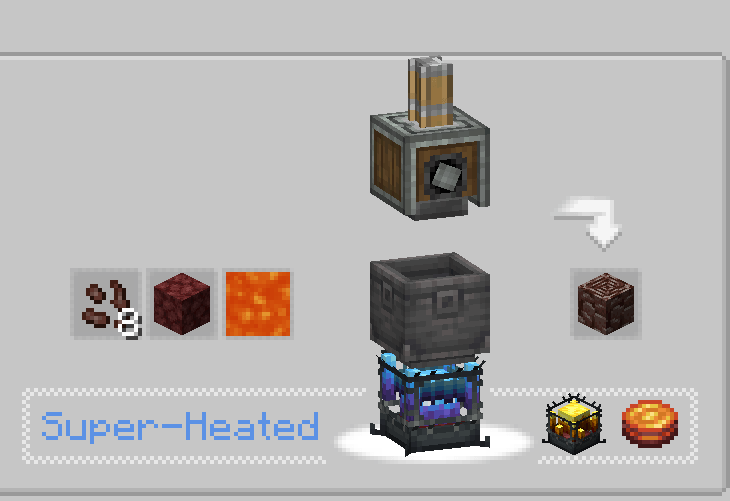
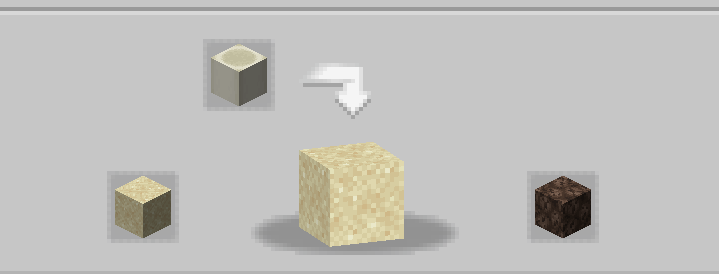
هدف هذا المود هو منح اللاعبين إمكانية صناعة وأتمتة معظم موارد النيذر حتى بدون الوصول إلى النيذر! يشمل ذلك Blazes وNetherite وNetherrack أو أي شيء آخر يخطر ببالك يكون محجوبًا خلف النيذر. إذا كنت تعتقد أن بعض الوصفات غير متوازنة أو لا تعمل أو مفقودة، فأخبرني في قسم التعليقات💬!
الأسئلة الشائعة (FAQ):
▶س: كيف أرى الوصفات؟ ج: يمكنك استخدام مودات عرض الوصفات مثل JEI أو EMI.
▶س: هل ستؤدي إزالة أو إضافة هذه الإضافة إلى عالم موجود إلى مشاكل؟ ج: يمكنك حذف أو إضافة هذا المود من أي عالم بأمان دون أي مشكلة.
▶س: هل سيأتي هذا المود يومًا ما على fabric؟ ج: نعم! فقط انقر هنا!
▶س: هل هذه الإضافة متاحة لـ 6.0.x؟ ج: نعم، إنها كذلك!
▶س: ما التالي للمود؟ ج: الإضافة متوقفة حاليًا لأننا نعمل على مشاريع أخرى. من المخطط إضافة محتوى جديد وموازنة، مع تقديم ectoplasm على سبيل المثال، لكن في الوقت الحالي، سيتعين عليك الانتظار!
▶هل لديك أسئلة أخرى؟ يمكنك الانضمام إلى سيرفر Discord الخاص بـ Honeycomb Studio وطرحها هناك!
آسف إذا ارتكبت أخطاء، أنا فرنسي.. إذا رأيت أخطاء إملائية، فالرجاء إخباري!
هذا المود لا يعطّل النيذر!
كيفية تثبيت Create: Netherless ((Neo)Forge)
With Millida Launcher
Install Millida Launcher
The launcher is free: download it at millida.net/launcher and sign in with any nickname.
Click “Install” on this page
The launcher opens and installs the mod for Minecraft 1.19.2–1.21.1 on Forge or NeoForge automatically.
Launch the game
A profile with it appears in the launcher: click “Play”.
Manually
Install Forge or NeoForge
The loader must match the game version of the mod file, for example Minecraft 1.21.1. After installing it, a separate profile appears in your launcher.
Download the file for your version
In the version list above, pick the file create_netherless-2.0.0-1.21.1.jar (30 KB) for your game version and loader.
Put it in the mods folder
The folder is inside .minecraft (Windows: %appdata%\.minecraft\mods). If it does not exist, create it.
Launch the loader profile
Open “Mods” in the main menu: Create: Netherless ((Neo)Forge) should be in the list.
Minecraft 1.21.1 runs on Java 21: with a different Java version the game may close right after launch.
الإصدارات
مع المتطلبات
| Minecraft | المشغّل | الملف | التاريخ | الإجراءات |
|---|---|---|---|---|
| 1.21.1 | NeoForge | create_netherless-2.0.0-1.21.1.jar30.2 KB 65 | ||
| 1.20.1 | Forge | create_netherless-2.0.0-1.20.1.jar30.1 KB 19 | ||
| 1.19.2 | Forge | Create: Netherless 1.19.2-1.137.6 KB 1 |
الأسئلة الشائعة
Which Minecraft versions does Create: Netherless ((Neo)Forge) work on?
There are files for 1.21.1, 1.20.1, 1.19.2. The newest is 1.21.1.
Is Create: Netherless ((Neo)Forge) for Forge or Fabric?
There are files for Forge: 1.19.2–1.20.1 and for NeoForge: 1.21.1. There are no files for Fabric: a mod for another loader will not start.
Does Create: Netherless ((Neo)Forge) need other mods?
The author lists no required dependencies: the Forge or NeoForge loader is enough.
Which Java does Create: Netherless ((Neo)Forge) need?
Minecraft 1.21.1 runs on Java 21. If the game closes right after launch, the usual cause is the wrong Java version in the profile settings.
Where can I download Create: Netherless ((Neo)Forge) safely?
On this page: the file create_netherless-2.0.0-1.21.1.jar (30 KB) is stored on Millida’s server, with no link shorteners. SHA-1 checksum: 2d3499b77c8bcbe8c7a301750271c3d2a0b35cbe.
التقييمات
كن أول من يقيّم Create: Netherless ((Neo)Forge)


