

Craftable Bells مود لماينكرافت 1.21.1, 1.21
تعديل يجعل الأجراس قابلة للصناعة في Minecraft.
 Fabric
 Forge
Forge NeoForge
 Quilt
QuiltCraftable Bells Mod
This Minecraft mod makes bells craftable, allowing you to easily obtain them without needing to find a village!
Features:
- Simple Crafting Recipe: Craft bells using common materials.
Crafting Recipe:
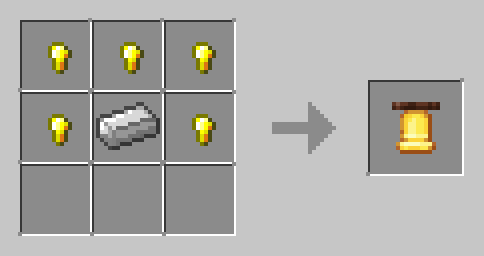
How to Install:
- Download the mod.
- Place the .jar file into the mods folder of your Minecraft world.
- restart your game to enable the mod.
Enjoy more bells in your Minecraft world!
كيفية تثبيت Craftable Bells
With Millida Launcher
Install Millida Launcher
The launcher is free: download it at millida.net/launcher and sign in with any nickname.
Click “Install” on this page
The launcher opens and installs the mod for Minecraft 1.21–26.3 on Fabric, Forge, NeoForge or Quilt automatically.
Launch the game
A profile with it appears in the launcher: click “Play”.
Manually
Install Fabric, Forge, NeoForge or Quilt
The loader must match the game version of the mod file, for example Minecraft 26.3. After installing it, a separate profile appears in your launcher.
Download the file for your version
In the version list above, pick the file craftable-bells-datapack-2.jar (3 KB) for your game version and loader.
Put it in the mods folder
The folder is inside .minecraft (Windows: %appdata%\.minecraft\mods). If it does not exist, create it.
Launch the loader profile
Open “Mods” in the main menu: Craftable Bells should be in the list.
الإصدارات
مع المتطلبات
| Minecraft | المشغّل | الملف | التاريخ | الإجراءات |
|---|---|---|---|---|
| 1.21 | Fabric, Forge, NeoForge, Quilt | craftable-bells-datapack-2.jar3.4 KB |
التقييمات
كن أول من يقيّم Craftable Bells


