
Construction Sticks مود لماينكرافت 1.20.1, 1.21.1
عصي تجعل البناء أسهل
 NeoForge
 Forge
Forgeحول مود Construction Sticks
تتيح لك عصي البناء وضع عدة كتل في وقت واحد، حتى 1024 كتلة في المرة الواحدة، مما يوسع بنائك في الاتجاه الذي تواجهه. يمكنك ترقية عصاك لتعزيز قدراتها، مما يجعل البناء أسرع وأكثر كفاءة.
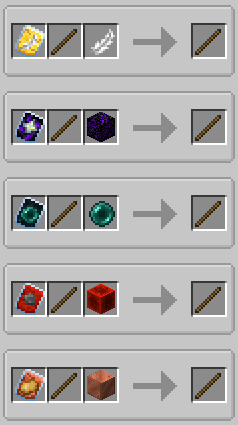
العصي
هناك خمس فئات مختلفة من عصي البناء: الخشب، النحاس، الحديد، الألماس، والنيثرايت. توفر كل فئة متانة محسنة وقدرات وضع كتل أفضل، ويمكن ترقيتها أكثر باستخدام القوالب.
متانة العصا الحد الأقصى للكتل قابلة للترقية زاوية المسافة الحد الأقصى للكتل (التدمير)
الخشب 59 3 نعم 1 1
النحاس 131 9 نعم 2 3
الحديد 250 27 نعم 4 9
الألماس 1561 128 نعم 8 25
النيثرايت 2031 1024 نعم 16 81
قوالب الترقية
تضيف القوالب ترقيات خاصة إلى عصي البناء الخاصة بك. لتطبيق قالب، اجمع العصا والقالب وعنصرًا إضافيًا في طاولة الحدادة.
القوالب المتاحة:
- الملاك: ضع الكتل خلف الكتل التي تواجهها أو في الهواء.
- التدمير: أزل الكتل بسرعة وكفاءة.
- غير قابل للكسر: يزيل استهلاك المتانة، مما يسمح بوضع كتل لا نهائي.
- البطارية: يتيح للعصا استخدام RF بدلاً من المتانة.
ميزات إضافية
- صناديق الشولكر والحزم والحاويات الأخرى: استخدمها كمصادر لكتل البناء.
- الوضع من اليد الثانية: ضع الكتل من يدك الثانية بدلاً من اليد التي تنظر إليها.
إخلاء المسؤولية
هذا تعديل متفرع من تعديل ConstructionWand الأصلي، المرخص بموجب MIT. تم تعديله لإضافة ميزات وتحسينات جديدة، بما في ذلك فئات وقوالب ووظائف جديدة. تم إنشاء التعديل الأصلي بواسطة Theta-Dev.
هل تحتاج إلى خادم؟ احصل على خصم 20% على شهرك الأول باستخدام رمز الترويج "mrbysco"
لأي أسئلة لا تتردد في الانضمام إلى Discord الخاص بي.
هل تريد دعمنا؟
-Mrbysco
-ShyNieke
كيفية تثبيت Construction Sticks
With Millida Launcher
Install Millida Launcher
The launcher is free: download it at millida.net/launcher and sign in with any nickname.
Click “Install” on this page
The launcher opens and installs the mod for Minecraft 1.20.1–26.1.2 on Forge or NeoForge automatically.
Launch the game
A profile with it appears in the launcher: click “Play”.
Manually
Install Forge or NeoForge
The loader must match the game version of the mod file, for example Minecraft 26.1.2. After installing it, a separate profile appears in your launcher.
Download the file for your version
In the version list above, pick the file ConstructionSticks-26.1.2-3.2.1.jar (264 KB) for your game version and loader.
Put it in the mods folder
The folder is inside .minecraft (Windows: %appdata%\.minecraft\mods). If it does not exist, create it.
Launch the loader profile
Open “Mods” in the main menu: Construction Sticks should be in the list.
الإصدارات
مع المتطلبات
| Minecraft | المشغّل | الملف | التاريخ | الإجراءات |
|---|---|---|---|---|
| 26.1.2 | NeoForge | ConstructionSticks-26.1.2-3.2.1.jar264 KB | ||
| 1.21.1 | NeoForge | ConstructionSticks-1.21.1-1.5.0.jar259 KB 5 | ||
| 1.20.1 | Forge, NeoForge | ConstructionSticks-1.20.1-1.2.7.jar253 KB 5 | ||
| 1.20.1 | Forge, NeoForge | ConstructionSticks-1.20.1-1.2.6.jar253 KB | ||
| 1.21.1 | NeoForge | ConstructionSticks-1.21.1-1.0.0.jar189 KB |
الأسئلة الشائعة
Which Minecraft versions does Construction Sticks work on?
There are files for 26.1.2, 1.21.1, 1.20.1. The newest is 26.1.2.
Is Construction Sticks for Forge or Fabric?
There are files for Forge: 1.20.1 and for NeoForge: 1.20.1–26.1.2. There are no files for Fabric: a mod for another loader will not start.
Does Construction Sticks need other mods?
The author lists no required dependencies: the Forge or NeoForge loader is enough.
Where can I download Construction Sticks safely?
On this page: the file ConstructionSticks-26.1.2-3.2.1.jar (264 KB) is stored on Millida’s server, with no link shorteners. SHA-1 checksum: 145147e476b514d63faaaf2801421f22bc68eb0d.
التقييمات
كن أول من يقيّم Construction Sticks


