
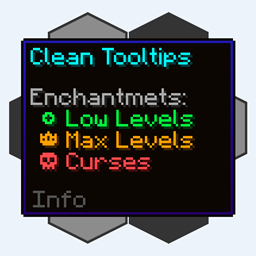
Clean Tooltips مود لماينكرافت 1.20.1, 1.21.10
تحسين التلميحات بإنشاء مظهر نظيف ومتناسق! تلميح المتانة والمزيد!
 NeoForge
 Fabric
 Forge
حول مود Clean Tooltips
تلميحات الأدوات النظيفة
هل شعرت يومًا أن تلميحات الأدوات الافتراضية يمكن تحسينها قليلاً؟ إذن هذا بالضبط ما تبحث عنه.
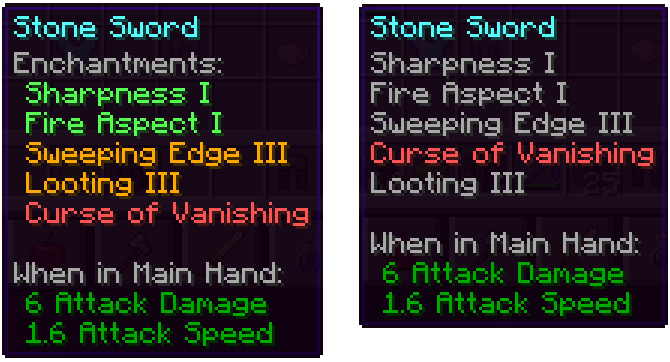
بشكل أساسي، يُعيد المود تصميم طريقة عرض التعويذات في تلميح الأدوات:
- أصبح لديها الآن تصنيف فرعي خاص بها باسم "التعويذات:"
- ترميز لوني لتمييز التعويذات الجيدة (الأخضر) واللعنات (الأحمر) بسهولة أكبر
- ستُعرض التعويذات ذات المستوى الأقصى باللون الذهبي
- تُرتَّب اللعنات دائمًا في أسفل القائمة
مع تثبيت المود: بدون تثبيت المود (الفانيلا):
إلى جانب ذلك، تحسّنت أيضًا أجزاء أخرى:
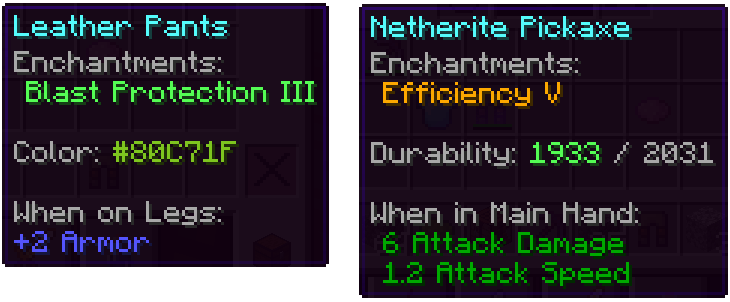
- أصبح الخط اللوني على العناصر المصبوغة يعرض الآن اللون المستخدم فعليًا
- تُظهر العناصر التالفة متانتها المتبقية في تلميح الأدوات
لدينا الكثير من الأفكار الأخرى حول كيفية تحسين تلميحات الأدوات في التحديثات المستقبلية. إلى جانب إضافة ميزات جديدة، ستضيف التحديثات القادمة أيضًا العديد من خيارات الإعداد.
كيفية تثبيت Clean Tooltips
With Millida Launcher
Install Millida Launcher
The launcher is free: download it at millida.net/launcher and sign in with any nickname.
Click “Install” on this page
The launcher opens and installs the mod for Minecraft 1.20.1–1.21.10 on Fabric, Forge or NeoForge automatically.
Launch the game
A profile with it appears in the launcher: click “Play”.
Manually
Install Fabric, Forge or NeoForge
The loader must match the game version of the mod file, for example Minecraft 1.21.10. After installing it, a separate profile appears in your launcher.
Download the file for your version
In the version list above, pick the file clean_tooltips-1.1-neoforge-1.21.10.jar (24 KB) for your game version and loader.
Put it in the mods folder
The folder is inside .minecraft (Windows: %appdata%\.minecraft\mods). If it does not exist, create it.
Launch the loader profile
Open “Mods” in the main menu: Clean Tooltips should be in the list.
Minecraft 1.21.10 runs on Java 21: with a different Java version the game may close right after launch.
الإصدارات
مع المتطلبات
| Minecraft | المشغّل | الملف | التاريخ | الإجراءات |
|---|---|---|---|---|
| 1.21.10 | NeoForge | clean_tooltips-1.1-neoforge-1.21.10.jar24.4 KB | ||
| 1.21.10 | Fabric | clean_tooltips-1.1-fabric-1.21.10.jar23.1 KB 3 | ||
| 1.20.1 | Forge | clean_tooltips-1.0-forge-1.20.1.jar25.8 KB 1 |
الأسئلة الشائعة
Which Minecraft versions does Clean Tooltips work on?
There are files for 1.21.10, 1.20.1. The newest is 1.21.10.
Is Clean Tooltips for Forge or Fabric?
There are files for Fabric: 1.21.10, for Forge: 1.20.1 and for NeoForge: 1.21.10.
Does Clean Tooltips need other mods?
The author lists no required dependencies: the Fabric, Forge or NeoForge loader is enough.
Which Java does Clean Tooltips need?
Minecraft 1.21.10 runs on Java 21. If the game closes right after launch, the usual cause is the wrong Java version in the profile settings.
Where can I download Clean Tooltips safely?
On this page: the file clean_tooltips-1.1-neoforge-1.21.10.jar (24 KB) is stored on Millida’s server, with no link shorteners. SHA-1 checksum: 594541adddbc0d20e2361a8fef21b5ed960c2588.
التقييمات
كن أول من يقيّم Clean Tooltips


