
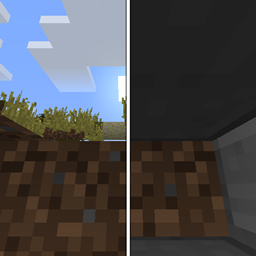
Block Overlay Fix مود لماينكرافت 1.12.2
يصلح الرؤية عبر الكتل عند الوقوف في كتل لا تسبب الاختناق
حول مود Block Overlay Fix
Block Overlay Fix هو مود من جهة العميل يعمل على إصلاح الرؤية عبر الكتل (xray) عند الوقوف داخل كتل لا تسبب الاختناق (بشكل أساسي الدرج والبلاطات والأوراق مع الرسومات السريعة).
يتطلب هذا المود تشغيل MixinBootstrap!
قد يكون Mixin 0.7-0.8 Compatibility مفيدًا عندما يستخدم مود آخر إصدار mixin أقدم وبالتالي لا تتمكن من تشغيل اللعبة.
كيفية تثبيت Block Overlay Fix
With Millida Launcher
Install Millida Launcher
The launcher is free: download it at millida.net/launcher and sign in with any nickname.
Click “Install” on this page
The launcher opens and installs the mod for Minecraft 1.12.2 automatically.
Launch the game
A profile with it appears in the launcher: click “Play”.
Manually
Download the file for your version
In the version list above, pick the file BlockOverlayFix-1.12.2-1.0.0.jar (8 KB) for your game version.
Put it in the mods folder
The folder is inside .minecraft (Windows: %appdata%\.minecraft\mods). If it does not exist, create it.
Launch the loader profile
Open “Mods” in the main menu: Block Overlay Fix should be in the list.
Minecraft 1.12.2 runs on Java 8: with a different Java version the game may close right after launch.
الإصدارات
مع المتطلبات
| Minecraft | المشغّل | الملف | التاريخ | الإجراءات |
|---|---|---|---|---|
| 1.12.2 | — | BlockOverlayFix-1.12.2-1.0.0.jar7.6 KB |
الأسئلة الشائعة
Which Minecraft versions does Block Overlay Fix work on?
Only Minecraft 1.12.2: there are no files for other versions.
Which Java does Block Overlay Fix need?
Minecraft 1.12.2 runs on Java 8. If the game closes right after launch, the usual cause is the wrong Java version in the profile settings.
Where can I download Block Overlay Fix safely?
On this page: the file BlockOverlayFix-1.12.2-1.0.0.jar (8 KB) is stored on Millida’s server, with no link shorteners. SHA-1 checksum: e8cf85505a2439cbc3d2599ecafb5d12653b1453.
التقييمات
كن أول من يقيّم Block Overlay Fix


