

Smelting Plus حزمة بيانات لماينكرافت 1.20.1, 1.21.1
Smelting Plus هي حزمة بيانات بسيطة لماينكرافت Java تتيح إعادة تدوير أفضل عند صهر العناصر التي تجدها أو تصنعها. بدلًا من الحصول على قطعة ذهب أو حديد صغيرة فقط، ستحصل الآن على سبيكة.
- تنزيلات
- 6 تنزيلات
- مشاهدة
- 60 مشاهدة
- محدّث
- محدّث 04.09.2026
- 1.19 — 1.21.11
 حزمة بيانات
- العميل والخادم
Smelting Plus v1.1.3 – Full Recycling for Copper Age & More!
(1.21.9 – 1.21.10 | Fabric • Forge • Quilt • Data Pack)

Tired of getting just nuggets when smelting tools and armor?
Smelting Plus fixes that: every item returns 1 full ingot (iron, gold, copper, diamond & netherite) instead of nuggets! Perfect for late-game recycling and modpacks.

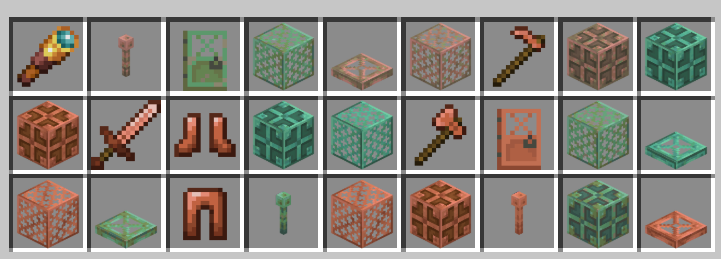
Full Copper Age 1.21.9+ support!
- Copper Pickaxe, Axe, Hoe, Sword
- Full Copper Armor Set + Horse Armor
- Copper Door, Trapdoor, Grate, Bulb, Lightning Rod
- Spyglass (2 ingots → 1 ingot back)
- All iron/gold/diamond/netherite tools & armor
- Buckets, rails, hoppers, cauldrons, shears, etc.
Features
- 1 ingot return on everything
- Works in regular & blast furnaces
The list of items you can smelt.
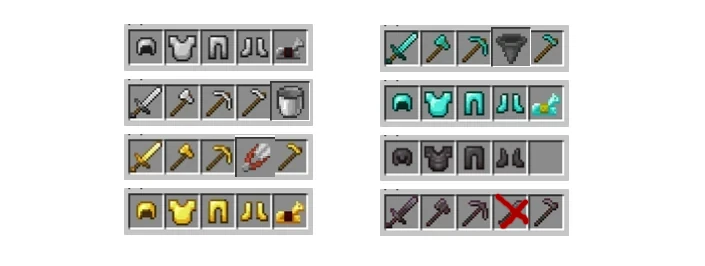
- iron pickaxe, iron axe, iron hoe, iron sword, iron helmet, iron chestplate, iron leggings, iron boots, iron horse armor.
- golden pickaxe, golden axe, golden hoe, golden sword, golden helmet, golden chestplate, golden leggings, golden boots, golden horse armor.
- diamond pickaxe, diamond axe, diamond hoe, diamond sword, diamond helmet, diamond chestplate, diamond leggings, diamond boots.
- netherite pickaxe, netherite axe, netherite hoe, netherite sword, netherite helmet, netherite chestplate, netherite leggings, netherite boots.
- bucket, hopper, and shears
The list of items you will get.
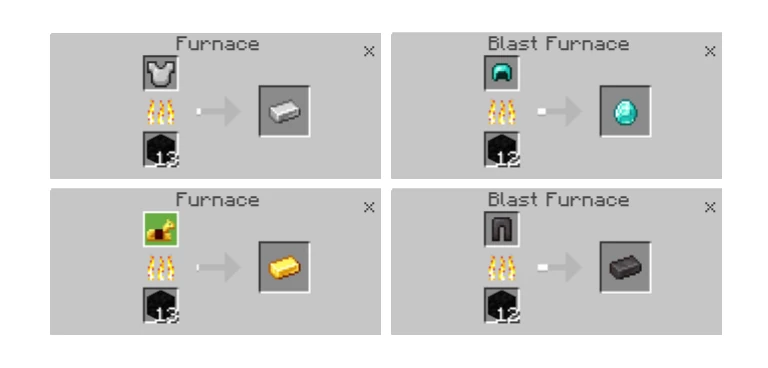
- iron ingot
- golden ingot
- copper ingot
- diamond
- netherite ingot
كيفية تثبيت Smelting Plus
With Millida Launcher
Install Millida Launcher
The launcher is free: download it at millida.net/launcher and sign in with any nickname.
Click “Install” on this page
The launcher opens and installs the data pack for Minecraft 1.19–1.21.11 automatically.
Launch the game
A profile with it appears in the launcher: click “Play”.
Manually
Download the archive
Pick the file Smelting_Plus_DataPack-V1.1.4.zip (125 KB) for your game version.
New world: “Data Packs”
When creating a world, click “Data Packs”, drag the archive into the window, then move it to “Selected”.
Existing world: the datapacks folder
Put the archive into saves/<world>/datapacks and type /reload in game.
On a server
Archive goes into the server world’s datapacks
The world/datapacks folder on the server; players do not need to install anything.
Reload the data
Type /reload in the server console or restart the server.
Use the “To server” button
On Millida Hosting, the button at the top of the page uploads the file to your server and restarts it for you.
الإصدارات
مع المتطلبات
| Minecraft | المشغّل | الملف | الإجراءات |
|---|---|---|---|
| 1.21.11 | حزمة بيانات | 1.21.11125 KB 3 | |
| 1.21 | حزمة بيانات | 1.21123 KB | |
| 1.20.1 | حزمة بيانات | 1.20.1123 KB 3 | |
| 1.19.2 | حزمة بيانات | 1.19.2123 KB |
الأسئلة الشائعة
Which Minecraft versions does Smelting Plus work on?
There are files for 1.19–1.21.11, 10 versions in total. The newest is 1.21.11.
Does Smelting Plus work on a server?
Yes: the data pack goes into the datapacks folder of the server world, and players do not need to install anything.
Where can I download Smelting Plus safely?
On this page: the file Smelting_Plus_DataPack-V1.1.4.zip (125 KB) is stored on Millida’s server, with no link shorteners. SHA-1 checksum: c4078b12536c48996e0bc9202fe5a6d658264e5b.
التقييمات
كن أول من يقيّم Smelting Plus


